
You are ready to leave the smartphone, but the laptop still has to get online on the train, at a client’s office, or in the café whose Wi-Fi never works. A hotspot is the feature that makes a dumb phone survivable as your only line. Without it, every hour away from a router is an hour you cannot work.
Here is the short answer: only a handful of dumb phones can share their data, and the words on the spec sheet will not tell you which. “Wi-Fi” in a feature list means the phone can join a network. It does not mean it can create one. The two Nokias most often recommended to new switchers have no Wi-Fi at all. And on the phones that can do it, your carrier and your plan get a vote, sometimes a veto.
So this guide does what the GPS guide did for navigation: it splits the feature into the parts that have to work, names the phones that pass every part, according to their makers’ own documentation, and tells you how to test yours before the return window closes.
A hotspot is three gates, not one feature
When your laptop joins a phone’s hotspot, three separate things have said yes. Any one of them can say no.
- The radio. The phone needs Wi-Fi hardware that can act as an access point, or a USB or Bluetooth connection that can carry data to a computer. A phone without a Wi-Fi radio cannot make a Wi-Fi hotspot, whatever else it does.
- The software. The maker has to build the feature in, and a carrier can strip it out of the firmware it ships.
- The plan. Your SIM has to be allowed to share data, and there has to be data to share.
Most “dumb phone with hotspot” lists check the first gate, if that. The second and third are where people get caught after the purchase.
Gate 1: does it even have a radio?
Start with the phones everyone recommends. Tom’s video “How to Actually Switch to a Flip Phone”, at 716,607 views when checked, puts it plainly: “Right now, your best bet is the Nokia 2660 Flip.” It is a good phone. It cannot share a connection with anything.
HMD’s spec sheet for the Nokia 2660 Flip lists its connectivity as Bluetooth 4.2, a 3.5 mm headphone jack and Micro USB. There is no Wi-Fi line. The operating system is S30+, HMD’s basic feature phone software. The Nokia 3210 4G spec sheet reads the same way: S30+, an LTE Cat1 modem, Bluetooth 5.0, USB-C, and no Wi-Fi. If the radio is not there, there is no setting to find.
Gate 2: Wi-Fi is not hotspot
This is the one that catches careful buyers, because the phone does have Wi-Fi.
The clearest proof comes from Sunbeam Wireless, which sells one rugged flip, the F1 Pro, in named software configurations. On its F1 Pro page, checked on 19 October 2026, thirteen configurations are listed. Twelve of them list WiFi. Only four, the Juniper, Aspen, Maple and Cypress, list Hotspot. The Hickory’s own page lists “Wi-Fi (data transfer)” among its features and then, under “It does NOT have:”, puts “Wi-Fi Hotspot” first. Same F1 Pro, Wi-Fi on the list, no hotspot.
The Nokia 2780 Flip shows the same gap from the carrier side. HMD’s user guide explains how to join a Wi-Fi network, and its “Internet and connections” chapter covers browsing, Bluetooth and Wi-Fi, with nothing on sharing your connection. Charity Mobile, a US carrier that sells the phone, lists it on its product page with Wi-Fi “802.11 b,g,n” and, one row below, “Mobile hotspot: No.”
Carriers say this about themselves. US Mobile’s hotspot help page warns that on carrier-branded phones, “hotspot may be blocked at the firmware level even if your US Mobile plan includes it.” The plan says yes, the phone says no, and nobody at the checkout mentions it.
Gate 3: the SIM has to be allowed to share
This is the gate the lists leave out, and the Light Phone documents it best.
Light’s hotspot support article says the feature “requires an appropriate SIM (ability and data to hotspot).” Light’s software change log shows how literally that is meant. LightOS v484, released for the Light Phone III on 13 May 2025, added this line: “Verify whether SIM card supports hotspot or not (carrier certification requirement).”
Read that again: getting the phone through carrier certification required the phone itself to ask the SIM whether it may share data, and to refuse if the answer is no. The hotspot toggle is on your phone, but the permission behind it sits with your carrier.
Other sellers phrase the same rule their own way. Charity Mobile’s page for the Kyocera DuraXV Extreme+ lists the hotspot as “Yes (requires Data Enabled line access).” Sunbeam’s carrier compatibility page says “some features such as hotspot will require a compatible cellular plan,” and marks Visible, Spectrum and US Cellular as “Not whitelisted” for its phones at all. And unlimited does not always mean unlimited sharing: US Mobile’s own page says its “Unlimited plans have limited hotspot available.”
The phones that pass all three
Every claim below comes from the manufacturer’s own pages or support documents, checked on 19 October 2026, unless another source is named.
Light Phone III and Light Phone II
Both have a working hotspot. Light’s tool availability page lists Hotspot among the tools “available for both Light Phone II and Light Phone III,” and the change log shows the Light Phone II has had a personal hotspot since a software update in September 2019. To switch it on, Light’s instructions are Settings, then Bluetooth & Wifi, then Personal Hotspot. You can name the network, set a password, and add Hotspot as a tool on the home menu from Light’s web dashboard.
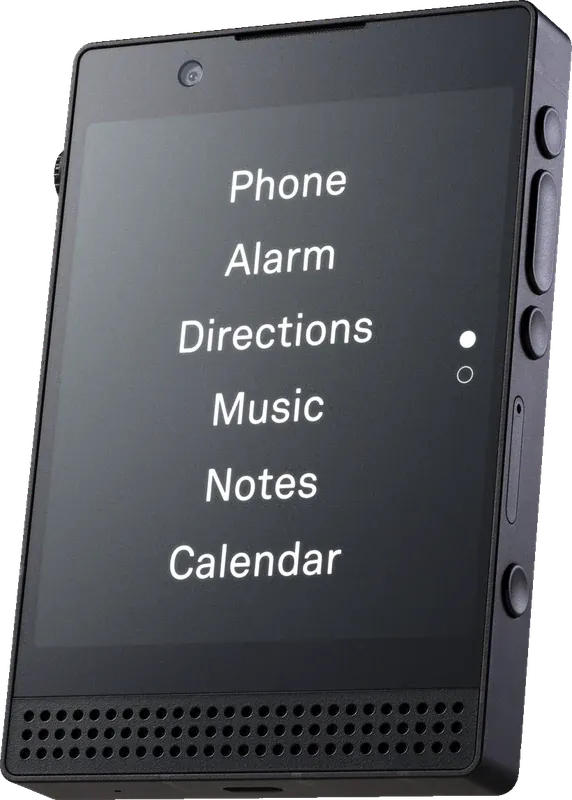
The Light Phone III. Image: Light.
Light also sells its own US plans, and its plan page is unusually frank about hotspot use. The $25 a month plan includes unlimited talk and text and 1GB of data, which a laptop can burn through quickly. The $45 a month plan has unlimited data and is, in Light’s words, “intended for users who plan to heavily use the Light Phone’s hotspot functionality.” It slows down after heavy use: “After 22GB & up to 50GB, data usage is slowed to a max of 3 Mbps,” and after 50GB it drops to 128 Kbps for the rest of the month. Both plans are for US users with a North American model only, and neither includes international roaming.
Two warnings from Light’s own pages. The first is battery: the hotspot will “drain the battery of the Light Phone more significantly,” and Light suggests keeping the phone plugged in for long sessions. Its battery page gives the Light Phone II a 950 mAh battery and the Light Phone III 1,800 mAh, both rated for one to three days of normal use. The second is calls: a July 2025 update for the Light Phone III restores the hotspot settings once a call has ended, which suggests that before the fix, taking a phone call could leave your laptop offline. If you plan to work tethered for hours, test a call while the laptop is connected.
Mudita Kompakt
The Kompakt, Mudita’s E Ink phone, has a Wi-Fi hotspot. Its support article puts the setting under Control Center, Settings, Network and Internet, Hotspot and Tethering, Wi-Fi Hotspot, where you can set the name, password and security. “The password must be 8 or more characters long.” There is also a hotspot toggle in Control Center, just above the airplane mode icon.
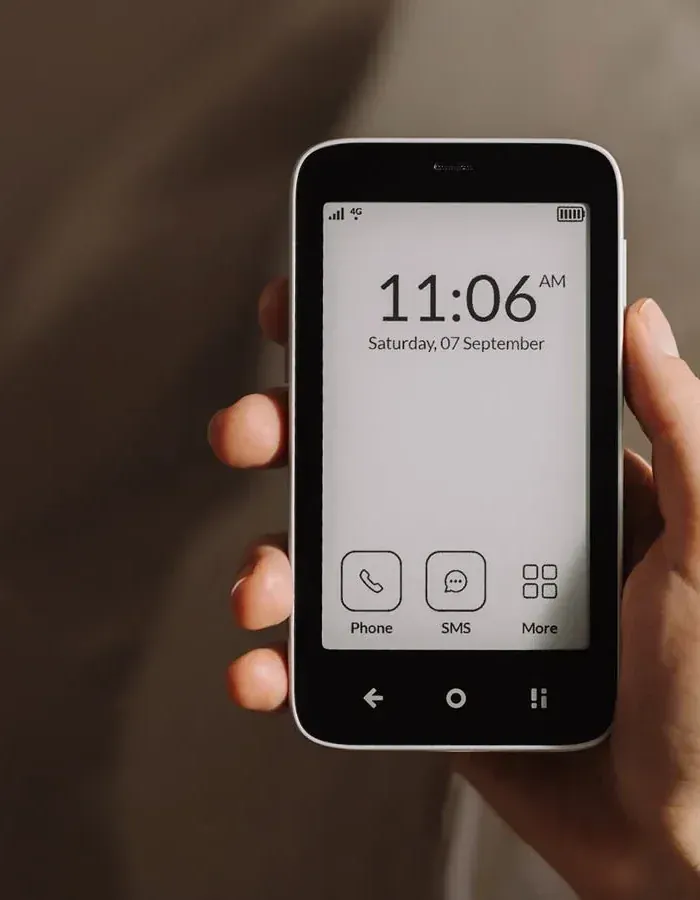
The Mudita Kompakt. Image: Mudita.
Mudita’s tethering answer describes the Wi-Fi hotspot only. It says nothing about USB or Bluetooth tethering, so treat the Wi-Fi hotspot as the feature you are buying. Mudita’s store listed the Kompakt at $399 when checked, sells it as a version labelled global and offers euro storefronts, which makes it the most practical choice on this list for readers in Europe.
Sunbeam F1 Pro, in the right configuration
The F1 Pro has a documented hotspot for well under $400, as long as you order one of the four configurations that have it. The Cypress costs $359 and is the plainest of the four: touchscreen, texting, camera, offline music, Bluetooth and a hotspot that lets you “share your phone’s data with other Wi-Fi devices.” The Juniper, Aspen and Maple add Waze, email or navigation on top.
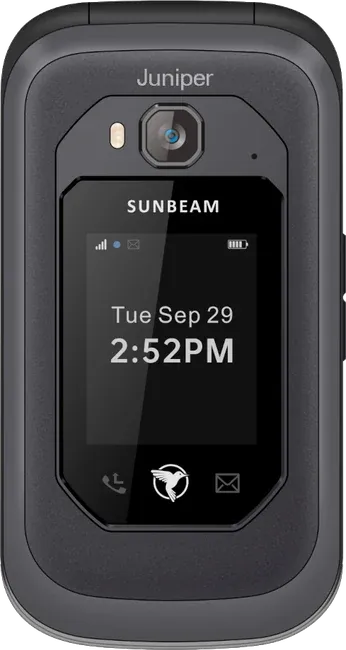
The Sunbeam F1 Pro, here in the Juniper configuration; the Cypress is the same phone with a different set of tools. Image: Sunbeam Wireless.
Two limits apply to all of them. Sunbeam says the phone “will not work in much of Europe, Africa, and Asia because it lacks the LTE bands required in those locations.” And its hotspot FAQ is explicit about what the hotspot does to the rest of the phone’s design: “Be aware that this would provide an unfiltered connection and would rely on the filter of your other device.” The same answer notes that “models with hotspot do not have the Tag logo on the back,” and the Cypress page lists TAG approval among the things it does not include. More on why that matters below.
Kyocera DuraXV Extreme+
Jose Briones, who reviews dumb phones on YouTube and says he buys every device he reviews, names this rugged flip as his honourable mention for the United States in his September 2026 roundup: “This device is rugged. It will last forever.” Charity Mobile’s listing shows Wi-Fi “802.11 a,b,g,k,n,r,ac” and a mobile hotspot, with the condition already quoted: it requires a data-enabled line.
Punkt MP02, if you can find one
Punkt pitches tethering as the MP02’s way online: its product page lists “Hotspot via USB, BT and WLAN,” and Punkt’s support answer says it can share internet with a tablet or laptop by Wi-Fi, Bluetooth or USB. It costs CHF 299 and was marked sold out when checked.
It also gives the best real number on battery drain in this category. The blogger David Charles measured it in a December 2019 review: “45 minutes of tethering used 10% of the battery; 70 minutes drained 19%.” The phone, he added, “does get warm.” At the time he also reported that Punkt had withdrawn USB and Bluetooth tethering; Punkt’s current page lists all three again, which is a reminder that a firmware update can add or remove this feature on a phone you already own.
Android phones sold as dumb phones
Phones that run full Android, such as the Unihertz Jelly Star or the Minimal Phone, inherit Android’s own hotspot settings. The carrier gate still applies, and the curated ones add a gate of their own. Techless lists the Wisephone II’s “Mobile Hotspot” as “(optional - Pro Plan only)” on its own service, where the Unlimited plan costs $69.99 a month on top of the $399 phone and $39 activation. On another carrier, Techless says access to data and hotspot is “based on current carrier.”
Joseph Emslie of Dumb Phones UK tested this kind of phone on video, using the CAT S22 Flip, a rugged Android flip, in “Does HOTSPOT Work On The Phone?”. Under Settings, Network and internet, Hotspot and tethering, the phone offered three options: a Wi-Fi hotspot, USB tethering and Bluetooth tethering. He set a password, connected a Unihertz Jelly Star, and loaded news pages and a YouTube video through it. Which apps run on these phones, and why the answer depends on Google certification, is in Android dumb phones.
The phones that cannot, or might not
- Nokia 2660 Flip and Nokia 3210 4G. No Wi-Fi listed on HMD’s spec sheets, so no Wi-Fi hotspot.
- Nokia 2780 Flip. Has Wi-Fi, but HMD’s guide documents no hotspot and at least one carrier sells it with “Mobile hotspot: No.” If you buy one for this, buy it from a seller that takes returns, and test it on your own SIM.
- Mudita Pure. Mudita’s support page is unambiguous: “The Pure does not have Wi-Fi and tethering is only possible through a USB-C cable connection.” It can act as a modem for a computer over a cable, which is genuinely useful at a desk and no help to a tablet that expects Wi-Fi. Its product page showed it sold out when checked.
Where the video roundups go wrong
TELEFONINO.NET’s October 2026 buyer’s guide, at 20,887 views in its first four days, names four things to check before buying a dumb phone. The third, in the English transcript, is “a hotspot, very useful for connecting your laptop via Wi-Fi.” It is good advice. The video then opens its list with the Nokia 3210 4G and the Nokia 2660 Flip, neither of which has Wi-Fi according to HMD. It praises the Mudita Pure for having “above all, a hotspot,” while Mudita says the Pure has no Wi-Fi and tethers only by cable, and lists it as sold out. In the recap the presenter switches to the Mudita Kompakt, which does have a Wi-Fi hotspot, so the two Muditas appear to have been blurred together.
Minimalist Setup’s “Best Dumb Phones with Hotspot”, from October 2025, includes the Nokia 2780 Flip and calls its “mobile hotspot function” one of its key features. That may be true on some carriers’ builds. It is not true on the one carrier quoted above, and HMD does not document it.
Neither video is careless by the standards of the genre. They are repeating spec-sheet shorthand, and spec-sheet shorthand is exactly where “Wi-Fi” turns into “hotspot.”
The uncomfortable part: a hotspot is a back door
Here is what the hotspot listicles skip. If you left the smartphone because of the feed, a dumb phone with a hotspot plus a Wi-Fi tablet in your bag is a smartphone in two pieces. Everything you removed comes back the moment the tablet joins the network.
The makers who build for restraint know this, and say so in their own documentation. Sunbeam pitches the Hickory as giving you its tools “without the dangers of a Wi-Fi Hotspot,” and warns that its hotspot models hand out an unfiltered connection. Light’s page for parents says: “We are also considering the ability to permanently remove/disable the hotspot, but don’t currently have a timeline for this.” Techless reserves it for its top plan. When the companies selling minimalism treat a feature as a risk, believe them.
The YouTuber Brandon makes the related point from the other side in “Dumb Phones Are Dumb.”, published on 11 October 2026. He notes that the Light Phone II “supports hotspot tethering,” then explains why he still does not use a dumb phone: “In an effort to have a simpler experience, I’d end up complicating my daily carry and having to buy more stuff to accommodate.” The hotspot is how a dumb phone life absorbs a laptop or a tablet. It is also how it quietly turns back into the life you left.
There is a disciplined version of this, and it is worth stealing. In his CAT S22 Flip test, Joseph Emslie suggests keeping the smartphone in airplane mode and letting it borrow the dumb phone’s hotspot only when you choose to. The Studio’s week-long dumb phone experiment, “We Switched to Dumbish Phones So You Won’t Have To”, ran a version of this with a Boox Palma e-reader using Google Maps over a phone’s hotspot. It worked, the tester reported, but “it’s a little delayed since it’s hot-spotting from my phone.” That friction is the point. Turning on a hotspot is a decision. Make it one you have to take each time, and keep the hotspot off by default.
How to check a phone before you buy it
- Look for the word “hotspot” or “tethering”, not “Wi-Fi”. Sunbeam’s Hickory has Wi-Fi and no hotspot. If the maker’s page or support site does not name the feature, assume it is missing.
- Find the setting in the maker’s documentation. Light and Mudita both publish the path. A phone whose maker cannot tell you where the switch is probably does not have one.
- Check who built the firmware. A phone sold by a carrier runs that carrier’s software, and US Mobile says hotspot can be blocked there even when the plan allows it. Unlocked phones from the maker are the safer bet.
- Ask your carrier whether your plan includes hotspot data, and how much. The Light Phone III will check the SIM itself and refuse if the answer is no.
- Test it inside the return window. Switch the hotspot on, connect a laptop, load a page, then make a phone call and see whether the laptop stays online.
- Plan for the battery. Punkt’s 1,280 mAh battery lost about a tenth of its charge in 45 minutes of tethering in David Charles’s test. For a working session, carry the cable.
Which to pick
- You live in the US and want the dumb phone to be your only line, laptop included. A Light Phone III on Light’s $45 unlimited plan, if the price of the phone does not put you off. The 1GB plan is not enough for regular laptop use.
- You want a documented hotspot for under $400, in the Americas. Sunbeam F1 Pro Cypress at $359. Order by configuration name and check it says Hotspot.
- You want something rugged on a US carrier. Kyocera DuraXV Extreme+ on a data-enabled line.
- You live in Europe. Mudita Kompakt, $399. Sunbeam’s phone lacks the bands for much of Europe, and Light’s own plans are US only.
- You want the cheapest phone and only need a laptop online at a desk. Nothing current on this list does that well: the Mudita Pure’s cable modem fits the description, but it was sold out when checked.
- You are buying for a teenager, or for yourself on a bad week. Buy a phone without a hotspot on purpose. Sunbeam’s Hickory exists for exactly this.
- You already own a Nokia 2660 Flip or 3210 4G. There is no setting to find. Plan your laptop work around Wi-Fi, or around the phone you are leaving in a drawer.
A hotspot answers one question: how to keep a laptop online without a smartphone. The other questions that decide whether the switch lasts, network compatibility, calls and texts, two-factor codes and banking, are in the complete dumb phone playbook. Navigation has the same three-part shape as this problem and its own guide, on which dumb phones really have GPS. And if the laptop is mostly how you plan to keep up with group chats, read dumb phones with WhatsApp first.
Sources: device and plan details come from the manufacturers and carriers, checked on 19 October 2026: HMD’s spec sheets for the Nokia 2660 Flip and Nokia 3210 4G and its Nokia 2780 Flip user guide; Light’s hotspot article, change log, tool availability page, US plans, battery page and page for parents; Mudita’s support articles on the Kompakt hotspot, Kompakt tethering and Pure, the Pure product page and Mudita’s store; Sunbeam Wireless’s F1 Pro page, the Cypress and Hickory pages, its hotspot FAQ and carrier compatibility page; Punkt’s MP02 page and support answer; Techless; Charity Mobile’s listings for the Nokia 2780 Flip and Kyocera DuraXV Extreme+; US Mobile’s hotspot help page. Battery measurements: David Charles, “Punkt MP02: Second Look”. Videos: Joseph Emslie, Dumb Phones UK, “Does HOTSPOT Work On The Phone? CAT S22 Flip”, TELEFONINO.NET, “5 DUMB PHONE per usare meno lo smartphone”, Minimalist Setup, “Best Dumb Phones with Hotspot”, Jose Briones, “The Best Dumb Phones You Should Consider in 2026”, Brandon, “Dumb Phones Are Dumb.”, The Studio, “We Switched to Dumbish Phones So You Won’t Have To” and Tom, “How to Actually Switch to a Flip Phone”.