
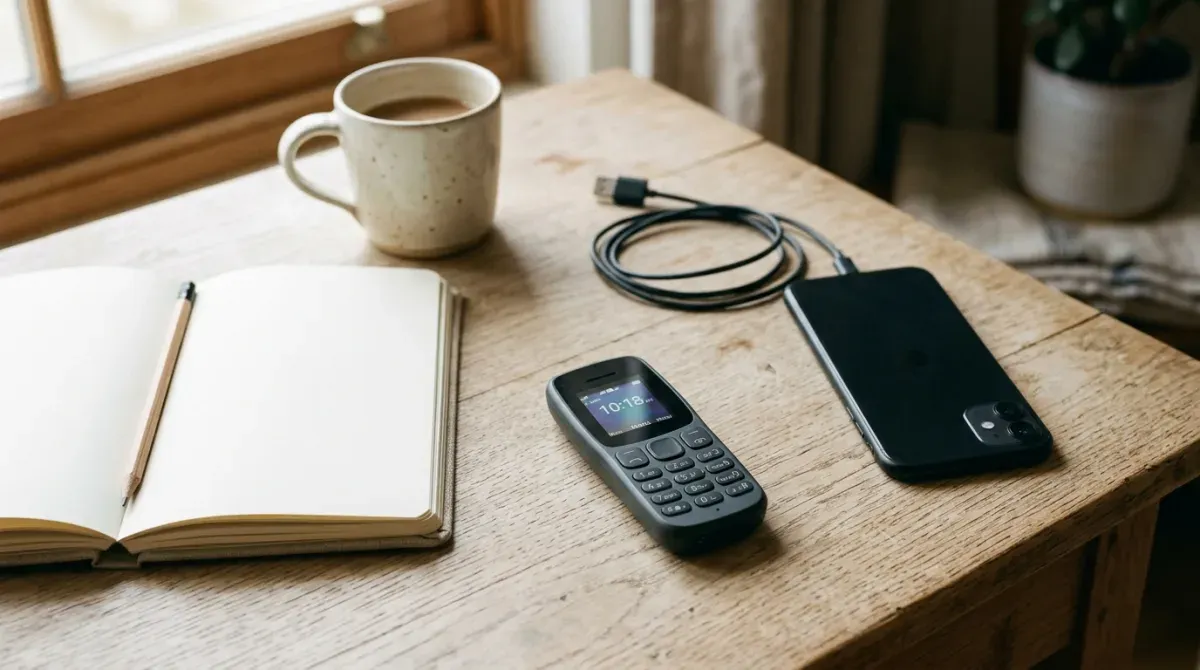
You want off the smartphone, but there are three apps you cannot drop: the bank, the messaging app your family uses, and maps. An Android dumb phone sounds like the obvious way out. Keypad or tiny screen on the outside, real apps on the inside, and nothing else.
Here is the uncomfortable part: the word “Android” on a dumb phone tells you almost nothing about which apps will run on it. The Light Phone III runs on Android underneath and cannot run WhatsApp. The RUIO Joy, a keypad phone sold in mainstream Australian electronics stores, runs Android, and its own maker says on the product page that “most banking apps won’t work.” The Unihertz Jelly Star runs Android and will happily install Instagram, TikTok and everything else you were trying to escape.
Three phones, one label, three completely different answers to the only question you actually have. The thing that separates them is not Android. It is whether Google has certified the phone, and almost nobody selling these devices puts that on the box.
This guide explains what that certification decides, sorts the phones sold as Android dumb phones into the four kinds that actually exist, and tells you how to check before you buy, so you do not find out at the checkout in the supermarket that your bank app refuses to open.
The line that matters is Google certification, not Android
Android itself is open source. Anyone can take it, put it on a phone and call the result an Android phone. What they cannot do without Google’s approval is ship the Google parts: the Play Store, Google Play services, Google Wallet, Android Auto and the rest.
Google’s Play Protect certification page says it plainly: “Only Play Protect certified devices are eligible to include Google apps, like the Google Play Store app.” On an uncertified phone, Google adds, “apps and features … may not work correctly,” and the device “may not get Android system updates or app updates.”
That is the polite version. Here is what it means in practice for the three things people usually buy an Android dumb phone to keep.
Banking apps can ask the phone whether it is certified, and many refuse to run if it is not. Google offers apps a check called the Play Integrity API. Its main device verdict, MEETS_DEVICE_INTEGRITY, means “the app is running on a genuine and certified Android device.” An uncertified phone cannot pass that check, whatever version of Android it runs. Whether an app enforces it is up to each developer, and banks are the apps with the most reason to. RUIO’s warning about banking apps is exactly this mechanism, stated by the manufacturer.
Tap to pay is a hard no. The Google Wallet help page requires Android 9 or later, NFC, and a phone that is Play Protect certified. It refuses to run on rooted phones or custom ROMs, and warns it may not work with an unlocked bootloader. Cheap keypad Androids often fail twice: the RUIO Joy below has no NFC chip at all, according to its quick start guide.
Android Auto needs a certified phone running Android 11 or later. Google’s Android Auto requirements list Android 11 or higher and an active data plan for both wired and wireless use, and note that Android Auto “is integrated into phones.” It is one of Google’s apps, which means it ships only where Google’s apps are allowed to ship. So if you were hoping for a dumb phone with Android Auto, you need a certified Android, on version 11 or later, and that rules out most of the keypad phones and every phone in the next section that runs without Google.
There is one more detail in Google’s documentation worth knowing. For the strictest verdict, MEETS_STRONG_INTEGRITY, a phone on Android 13 or later must have had security updates “in the last year.” So an app that wants the strongest guarantee will turn away even a certified phone that the maker has stopped updating. Keep that in mind when you read the security patch dates below.
The four kinds of Android dumb phone
Once you sort by certification and by how locked down the software is, the whole category falls into four groups. Every product below is described from its manufacturer’s own pages, checked on 12 October 2026.
1. Android underneath, but no apps: the Light Phone III
Light does not market the Light Phone III as an Android phone, but its developer program page describes the software kit as “a paired down version of the standard native Android development experience,” built around Jetpack Compose. LightOS is Android with almost everything taken away.
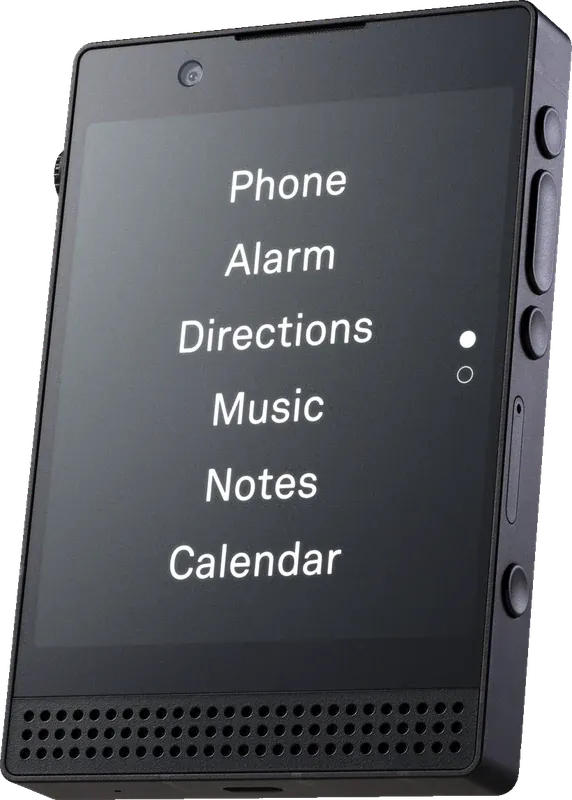
The Light Phone III. Image: Light.
What you get is Light’s own set of tools, not apps. Light’s tool availability page lists the Light Phone III’s tools, from Alarm and Music to Rideshare and Authenticator, and none of them is WhatsApp, Signal or Spotify. Users ask for “tools like Spotify, Signal, What’sApp,” the page says, but in a passage still written for the Light Phone II it adds that these would “require a deeper collaboration with the platform,” with no “realistic timeline at this moment.”
Two things are changing this autumn. Light’s developer program page says a Tool Library of user-made tools opens in November, with submissions from the first week of October, and limited to the Light Phone III. The rules exclude “social media, internet browser, news, email or other infinite feeds.” And a Developer Mode in the dashboard “will allow you to side-load whatever APK you’d like.” Read the next sentence on the same page before you get excited: pre-existing apps “may not work well (or at all),” partly because of the “lack of GMS certifications.” GMS is Google Mobile Services, the certified Google layer. That is the certification line again, this time from Light.
So the Light Phone III is an Android dumb phone in the most literal sense, and it is the right choice if you want none of your apps back. It is the wrong choice if the whole point was to keep the bank.
2. Curated Android: the phone decides which apps you get
These are ordinary smartphones running a locked-down layer on top, with a list of permitted apps. Because the hardware underneath is mainstream, they are the group most likely to run the apps that check certification.
Wisephone II is built on a Samsung Galaxy A17 5G running what Techless calls “Locked Down Android 17.” Its Tool Drawer lists 1Password, Bank of America, Venmo, Uber, Waze, WhatsApp, Signal and Spotify, among others, with the warning that the company can “add or remove third-party apps at any time.” It costs $399 plus a $39 activation fee, and every Wisephone needs a WiseOS subscription: $14.99 a month on your own carrier, or carrier plans from $24.99 a month for 1GB. The page does not mention Google Wallet or Android Auto, so do not assume either.
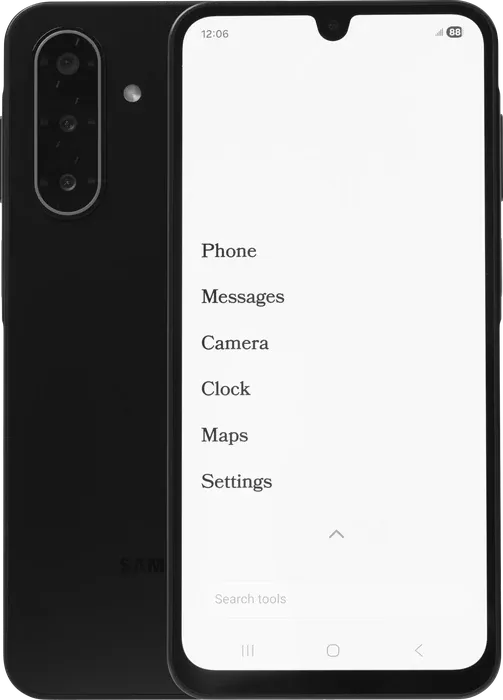
The Wisephone II. Image: Techless.
Balance Phone goes the other way: Samsung Galaxy hardware with Balance OS on top, and “the full Google Play Store, millions of apps, and almost everything that exists is allowed.” Social media, games, gambling, pornography and streaming are blocked at system level; apps in those categories may install but will not open. Balance names banking among the things you can still do. Prices are €299 for the Kids model on a Galaxy A17, €449 for the standard model on a Galaxy A37 5G, and €749 for the Pro on a Galaxy S25, and several were marked sold out when checked.
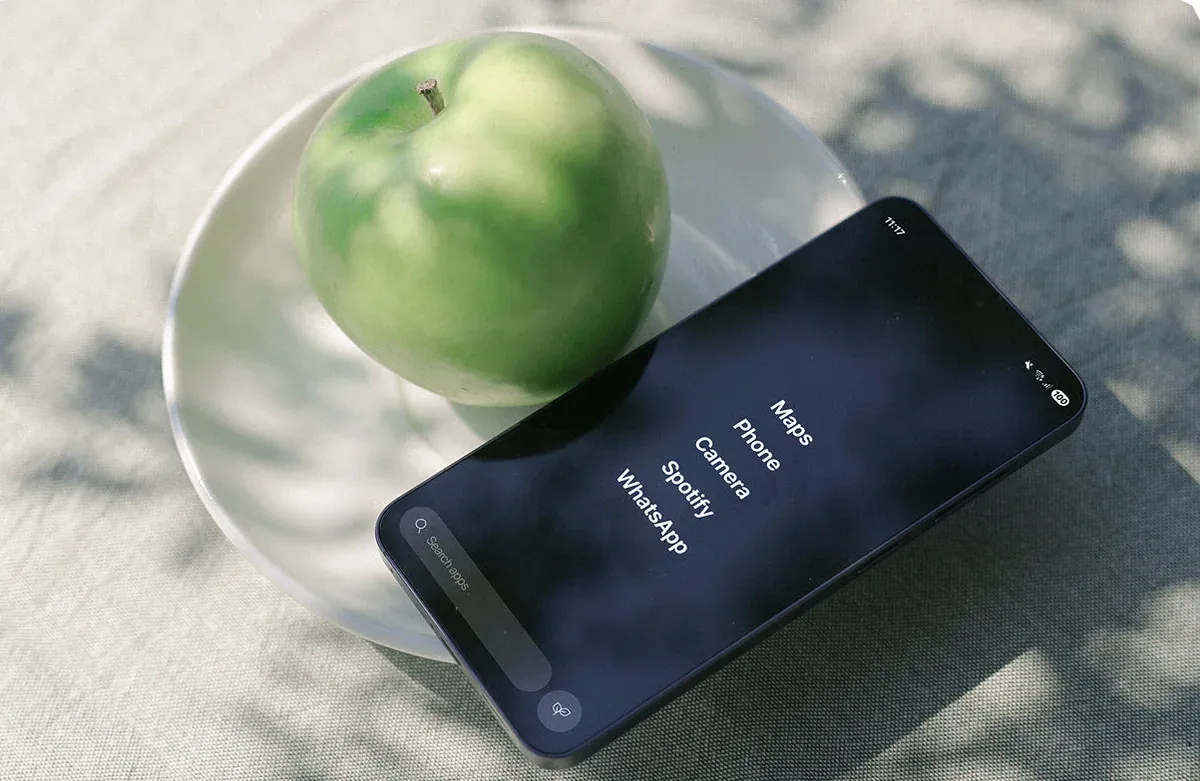
The Balance Phone. Image: Balance Phone.
Sunbeam F1 Pro is a rugged flip at $389 that ships Google’s Waze app and text-only email, with no app store and no web browser. Sunbeam does not say which system it runs, and warns that Waze “does not work well with the keypad and requires you to use the touchscreen.” It is built for the Americas and, in Sunbeam’s words, “will not work in much of Europe, Africa, and Asia.” You get exactly the apps on the list, which for most people means no bank app.
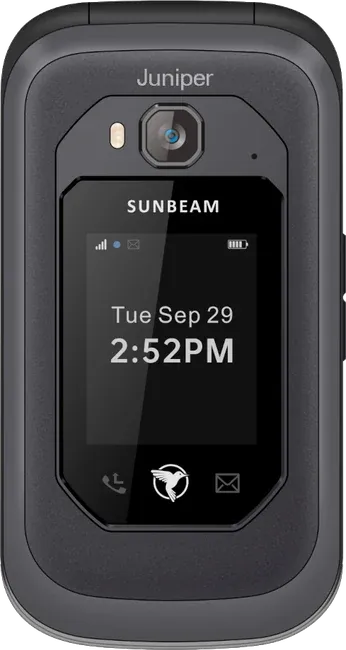
The Sunbeam F1 Pro (Juniper). Image: Sunbeam Wireless.
The trade with all three is the same. Someone else decides your app list, and that list can change. If your bank is on it, this is the most reliable way to have a dumb phone that does banking.
3. Open Android without Google: you can install anything, but not everything works
This is the group that causes the most disappointment, because on paper it looks like the best of both worlds. You can install apps. Just not from Google, and not with any promise they will work.
The RUIO Joy is the clearest example, because its maker is unusually honest. It is a T9 keypad phone with a 2.8-inch 640 by 480 touchscreen, 2GB of RAM and a 2150mAh battery, sold through JB Hi-Fi and Harvey Norman in Australia. The RUIO Joy product page says it “runs Android 11 (AOSP), security patch Nov 2022,” and then, in its own words: “No GMS (Google Mobile Service), most banking apps won’t work.” The same page lists a software update released on 18 August 2026 and still gives the security patch as November 2022.
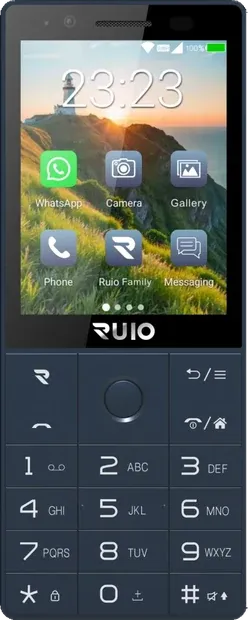
The RUIO Joy. Image: RUIO.
Instead of Google Play it ships APKPure Lite, and a later update added Aptoide, two third-party stores. It comes with Facebook, Instagram and WhatsApp preinstalled, which tells you this is not a phone designed to keep you off social media.
The Australian YouTuber frokfrdk bought one for A$99, about US$69, and spent 46 minutes taking it apart in software. His findings are the best description of this whole group. The processor is a MediaTek MT6739 at 800MHz. Of the 16GB of storage, the system takes about 4. YouTube opens in the browser because there are no Google Play services. APKPure installs some apps and silently fails on others: Firefox would not install, Firefox Beta would. On Aptoide, he noted, you are asked to flag fake apps and viruses yourself, which he called outsourcing the quality control to the customer. For maps he used a wrapper around the Google Maps website, which he said is “genuinely better than nothing” until it breaks. And yet he ends up fond of it: for A$99 it is a cheerful little Android you can walk into a shop and buy.
The Mudita Kompakt is the premium version of the same idea, at $399 with a 4.3-inch E Ink screen. Mudita’s support documentation says MuditaOS K “is based on the Android Open Source Project (AOSP)” and “is designed to run without and does not support Google Services.” You can sideload Android apps through the Mudita Center desktop program, but “sideloaded apps that depend on Google Services likely won’t be able to work correctly.” Unlike the RUIO, the Kompakt product page promises five years of software and security updates, which matters a great deal when the phone has no Google behind it.
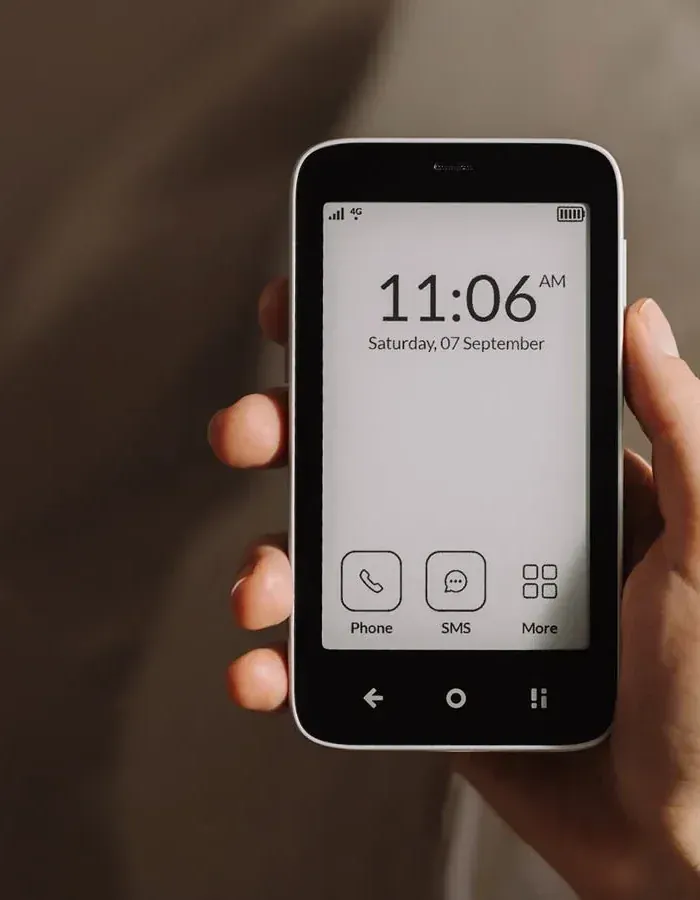
The Mudita Kompakt. Image: Mudita.
Japanese Android flip phones are the enthusiast’s route. The YouTuber YewfNet has used them as a dumb phone since 2024 and, in an October 2026 video, upgraded to a Kyocera DIGNO Keitai 4, bought on eBay for $97 and running Android 10 according to the video, which already puts it under the Android 11 floor for Android Auto. The setup is a good preview of what this group asks of you: the carrier’s APN settings had to be typed in by hand before the SIM would work at all, apps had to be sideloaded from a computer over USB, and the Aurora Store, an alternative front end to the Play Store, would only accept numbers from the keypad, not letters. Discord and Google Maps Go worked. Rooting the phone would add Google Play services, the video notes, but YewfNet has not bothered. That is a reasonable life for someone who enjoys tinkering. It is a bad plan for someone who needs the bank app to open on Monday.
The pattern across all three: messaging apps that do not depend heavily on Google often work, and WhatsApp comes preinstalled on the RUIO. Banking, payments, Android Auto and anything that checks certification are the first things to fail.
4. Certified small Android: everything works, including the problem
At the other end are small phones that are simply certified Android smartphones.
The Unihertz Jelly Star is the standard example: a 3-inch screen, Android 13, NFC, and a product page stating it “has obtained Google Certification” with “millions of Apps on Google Play.” It was $219.99 on sale when checked, down from $229.99. Banking apps should install from the Play Store like on any phone, because it passes the check they use.
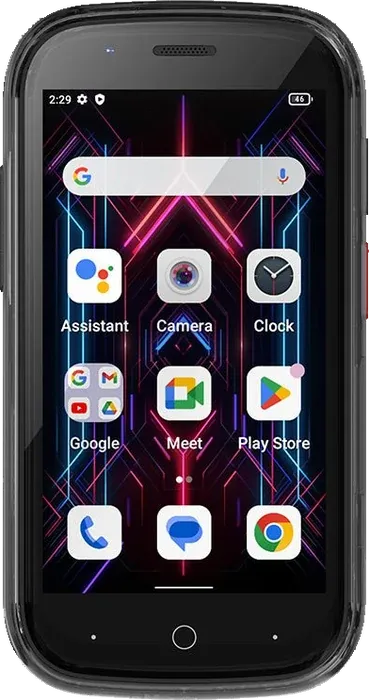
The Unihertz Jelly Star. Image: Unihertz.
On Unihertz’s own product render, the Play Store icon sits on the first home screen. Instagram is one tap and one download away. The bet with these phones is that the small screen makes the bad apps unpleasant enough that you stop, and for some people that holds. The keyboard phones, such as the Unihertz Titan 2, the Minimal Phone and the Clicks Communicator, belong here too, and are covered in dumb phones with keyboards.
How to check a phone before you buy it
Most listings will not tell you any of this directly, so ask these questions in this order.
- Does the manufacturer say “Google certified”, “Google Play” or “GMS”? If yes, banking and Android Auto are possible. If the page says “AOSP”, “no Google services” or “de-Googled”, assume your bank app will not work unless the bank tells you otherwise.
- Does it list Google Play, or a different store? APKPure, Aptoide, Aurora or a desktop sideloading tool all mean the phone is not certified.
- What is the Android version and the security patch date? Android 11 is the floor for Android Auto and Android 9 for Google Wallet. A patch more than a year old will fail the strictest integrity check on Android 13 and later, and is a security problem on a phone you plan to bank on.
- Is your bank actually on the list? On curated phones like Wisephone, read the published app list. The list can change, so check it again before the return window closes.
- Does it have NFC? Without it, tap to pay is off the table regardless of certification.
If a phone is already in your hands, Google’s own check takes ten seconds: open the Play Store, tap your profile icon, then Settings, then About, and look for “Play Protect certification.”
The roundups get this wrong, and confidently
An April 2026 YouTube video called “Best Android Dumb Phones 2026” lists the Light Phone III as having “a custom Android system that supports WhatsApp and Spotify.” The custom Android part is true. The WhatsApp and Spotify part is the opposite of what Light itself says on its tool availability page, quoted above. The same video says the Mudita Kompakt “supports WhatsApp and Spotify”, while Mudita makes no such promise and warns that apps depending on Google services likely will not work.
This is the pattern across the category: “runs Android” gets quietly upgraded to “runs your apps.” If a list does not tell you whether each phone is certified, it has not answered your question.
The cheapest Android dumb phone is the one you already own
If the apps you cannot drop are banking, payments and Android Auto, there is a strong case for not buying anything. Your current phone is certified, updated, and passes every check those apps use. What it lacks is restraint, and Android lets you add a surprising amount of that.
A minimal launcher such as Olauncher replaces the home screen with a short text list. A free desktop tool called ADB App Control lets you uninstall apps the manufacturer will not let you delete, including the browser and YouTube. Lauren and Jeremy Mefford’s step-by-step video does exactly this on a Pixel 7, in what they say takes 10 or 15 minutes: Developer Options, USB debugging, then Chrome, Gmail, the Google app and YouTube removed from a computer. They also flag the catch. Without a browser, some apps cannot complete a login, so they reinstall Chrome for a few minutes when they need to sign in, then remove it again. Removing the Play Store as well is possible, but they warn it can stop your remaining apps from updating.
The whole setup, with the launcher choices and blockers, is in dumb phone apps. It keeps everything that depends on certification working, at the cost of relying on your own discipline instead of the hardware’s.
What goes wrong, whichever kind you pick
- The bank app works until it updates. Integrity checks are switched on by the app’s developer, and a bank can start enforcing one in any update. If you depend on a phone outside group 2 or 4, keep the bank’s website bookmarked as a fallback.
- Network setup is on you. Imported and uncertified phones may need APN settings typed in by hand, as YewfNet found, and many are built for one region’s bands. Check carrier compatibility before you buy; the network side is covered in the complete dumb phone playbook.
- Third-party app stores are not curated. APKPure and Aptoide carry most Play Store apps, but frokfrdk’s experience was that some install and some do not, with no explanation.
- Updates stop. The RUIO’s page shows a 2022 security patch on a phone sold in 2026. Look for a stated update promise, like Mudita’s five years, before you trust a phone with your accounts.
- Keypads and touch apps fight. Apps designed for a touchscreen, from Waze on the Sunbeam to the Aurora Store on the Kyocera, can be awkward or unusable with keys alone.
Which to pick
- You want your bank and payments, and a hard limit on everything else. A curated Android: Wisephone II if your bank is on its list and its service works where you live, Balance Phone if you want the Play Store with blocked categories and Samsung hardware.
- You want a small phone with every app available, and you trust yourself. Unihertz Jelly Star, certified, $219.99. Accept that it is a smartphone.
- You want a keypad and you only need messaging. A cheap open Android like the RUIO Joy can work, but assume banking and Android Auto will not, and assume no meaningful security updates.
- You want E Ink, no Google, and updates you can count on. Mudita Kompakt, with the understanding that Google-dependent apps are a gamble.
- You want none of your apps back. Light Phone III, and watch the Tool Library when it opens in November.
- Your must-have list is banking, Wallet and Android Auto. Do not buy a dumb phone for this. Strip down the Android you already have.
If you are on an iPhone rather than Android, the equivalent route is Apple’s own lock, covered in how to turn an iPhone into a dumb phone. And whichever phone you land on, the two apps people miss most have their own guides: WhatsApp on a dumb phone and Spotify on a dumb phone. If the plan is to keep a laptop online instead, which dumb phones really have a hotspot depends on your carrier as much as on the phone.
Sources: Google’s rules come from Google’s own documentation on Play Protect certification, Play Integrity verdicts, Google Wallet requirements and Android Auto requirements. Device details and prices come from the manufacturers, checked on 12 October 2026: Light’s developer program and tool availability page; Wisephone; Balance Phone; Sunbeam Wireless; RUIO; Mudita’s support documentation, product page and store; Unihertz. Videos: frokfrdk, “I Bought a Brand New $99 Android Dumbphone!”, YewfNet, “Upgrading My Dumbphone”, Lauren and Jeremy Mefford, “How I Turned My Android into a Dumb Phone” and Minimalist Setup, “Best Android Dumb Phones 2026”.